
guide
WezTerm TOML Files
Rusty imports terminal color presets from WezTerm-compatible TOML files in term/.
Where Rusty Looks
- Near executable:
term/ - Near executable:
dist/term/ - Current working directory:
term/ - Current working directory:
dist/term/
Only .toml files are loaded.
Selection and Identity Rules
- Theme ID = filename stem lowercased (example:
tokyo-night.toml->tokyo-night). - Name uses root
name, then[metadata].name, then filename fallback. - Comment uses root
comment, then[metadata].author. - Duplicate IDs are skipped. Duplicate names are also skipped.
Required and Optional Colors
Rusty reads keys from [colors] first, then root-level fallback keys.
| Field | Requirement | Fallback |
|---|---|---|
background | Required | None (theme rejected if missing) |
foreground / fg | Required | None (theme rejected if missing) |
cursor / cursor_bg / cursor_border | Optional | Foreground |
selection_bg | Optional | #334466 |
selection_fg | Optional | Foreground |
| ANSI palette | Required | Defined via arrays or named keys |
ANSI Palette Requirements
Option A: Arrays
ansimust contain exactly 8 colors.brightsmust contain exactly 8 colors.
Option B: Named Keys
black,red,green,yellow,blue,magenta,cyan,whitebright_black,bright_red,bright_green,bright_yellow,bright_blue,bright_magenta,bright_cyan,bright_white
Indexed Overrides
- Optional
[indexed]or[colors.indexed]numeric overrides for palette indexes0-15.
Supported Color Value Forms
- String color values (parsed with WezTerm-compatible
SrgbaTupleparser). - Numeric arrays:
[r, g, b]or[r, g, b, a]. - Tables with nested color or RGBA keys, for example
{ color = "#88c0d0" }or{ r = 136, g = 192, b = 208 }. - Numeric scale can be 0-1 or 0-255.
Alpha is parsed but terminal rendering stores RGB values. Fully transparent values are rejected for required palette colors.
Light/Dark Classification
- If
light = true|falseexists, Rusty uses that. - Otherwise Rusty infers light mode from background luminance.
Practical Example
light = false
comment = "Balanced dark blue"

[metadata]
name = "Tokyo Night"
author = "Rusty"

[colors]
foreground = "#C0CAF5"
background = "#1A1B26"
cursor_bg = "#C0CAF5"
selection_bg = "#33467C"
selection_fg = "#C0CAF5"
ansi = ["#15161E", "#F7768E", "#9ECE6A", "#E0AF68", "#7AA2F7", "#BB9AF7", "#7DCFFF", "#A9B1D6"]
brights = ["#414868", "#F7768E", "#9ECE6A", "#E0AF68", "#7AA2F7", "#BB9AF7", "#7DCFFF", "#C0CAF5"]
How To Apply In Rusty
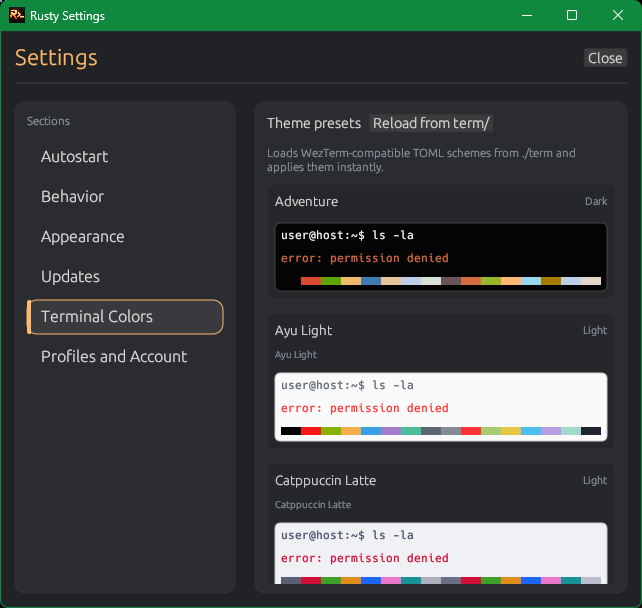
- Place TOML files into
term/. - Open Settings -> Terminal Colors.
- Click
Reload from term/. - Click a theme card to apply instantly.
If a selected terminal theme is missing at startup, Rusty applies fallback terminal colors and clears invalid selection state.